
Unified Namespace
How AnyLog generates and manages a Unified Namespace (UNS) for operational data
A Unified Namespace (UNS) is a modeling tool for organizing and representing physical or logical assets in a structured hierarchy — similar in purpose to Historian Asset Frameworks, but designed for decentralized, real-time operational environments.
Unlike traditional architectures where operational data must be centralized before it becomes broadly accessible, AnyLog’s UNS enables systems to interact with data as it is generated across the network. This creates a single, consistent view of operational data that can be accessed by multiple applications simultaneously — without requiring large-scale data movement.
From AnyLog’s point of view, a UNS is metadata about the actual data stored on the blockchain. It is up to the user to decide how and where to use it within their infrastructure.
Auto-Generated vs. User-Defined
AnyLog supports two approaches to UNS creation, which can be used independently or together.
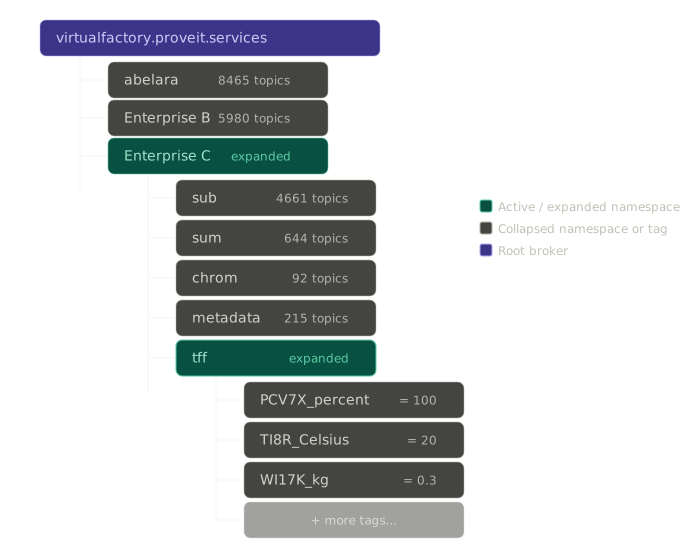
Auto-generated UNS — when data arrives dynamically via MQTT, OPC-UA, or other formats, AnyLog builds a hierarchical structure automatically from the topic or path of the incoming data. This lets users drill down the namespace tree to find any data point without any manual configuration.
User-defined UNS — users can define their own hierarchical structure explicitly. This supports data sources that don’t arrive dynamically and gives teams the ability to model assets in a way that reflects their own organizational or project structure. This is an ability most historians do not support.
The UNS structure can follow a rigid standard like ISA-95, or a more flexible project-defined hierarchy. Because AnyLog treats the UNS as a type of metadata, both approaches can coexist — a dynamically generated namespace can be extended or paralleled with additional user-defined context.
For a working example of hand-authored UNS policies (ex. ISA-95 metadata), see Custom UNS (data stream, ISA-95).
Ingesting Data with dynamic=true
dynamic=true in a run msg client command replaces specifying a fixed table=... — instead of you naming the
destination table, AnyLog derives and auto-creates it, and generates a UNS structure for it as part of the
blockchain’s metadata. That’s independent of whether you also provide column mapping (column.*); there are two
distinct cases depending on the shape of the incoming payload.
Because dynamic=true always needs to publish the auto-generated table/UNS policy to the blockchain, every example
below includes master_node = !ledger_conn — that’s required for dynamic=true specifically, unlike plain inline
or policy-based mapping, which don’t create new policies and so don’t need it.
Case 1: no column mapping — single scalar value per message
When no column.* mapping is given, AnyLog expects each incoming message to carry a single scalar value
(integer, float, string, or boolean) rather than a full JSON payload — similar to how OPC-UA data is handled. The
topic path itself becomes the namespace, and each topic segment gets its own table.
<run msg client where
    broker = 172.104.228.251 and port = 1883 and
    user = anyloguser and password = mqtt4AnyLog! and
    master_node = !ledger_conn and log = false and
    topic = (
        name = "Enterprise C/tff/PCV7X/#" and
        dbms = !default_dbms and
        dynamic = true
    )>
In the example above, the # wildcard subscribes to all topics under Enterprise C/tff/PCV7X.
Each arriving message — for example Enterprise C/tff/PCV7X/percent with value 50 — is stored directly using the
topic path as the namespace address, with no mapping policy required.
Case 2: with column mapping — a JSON payload with multiple key/value pairs
If the incoming JSON instead carries multiple fields, combine dynamic=true with explicit column mapping. Instead
of exploding the topic hierarchy into many single-value tables, this produces one (dynamically named/created) table
per topic holding all the mapped columns.
Instead of the fixed-table, inline-mapping form:
<run msg client where
  broker=local and
  log=false and topic=(
   name=my-data and
   dbms="bring [dbms]" and
   table="bring [sensor]" and
   column.timestamp.timestamp="bring [timestamp]" and
   column.value.float="bring [value]"
)>
table="bring [sensor]" is replaced with dynamic=true, and master_node is added (per the note above):
<run msg client where
  broker=local and master_node = !ledger_conn and
  log=false and topic=(
   name=my-data and
   dbms="bring [dbms]" and
   dynamic=true and
   column.timestamp.timestamp="bring [timestamp]" and
   column.value.float="bring [value]"
)>
If the topic itself carries multiple distinct measurements (rather than one clean value per topic), dynamic=true
alone would collapse them into a single table per topic — since it only knows how to walk the topic string segment
by segment. To split them into separate tables, extract a per-row table field from the payload and let it act as
one more segment beyond the raw topic; see
Dynamic Ingestion with Custom UNS — Factory Floor Example for a full traced
walkthrough of exactly how that works, down to the blockchain queries showing where the raw topic ends and the
personalized table field takes over.
Example: ProveIt virtual factory (authenticated MQTT)
The ProveIt demo MQTT broker virtualfactory.proveit.services exposes read-only credentials. Point
master_node at your AnyLog master (here 192.168.1.88:32048). Use dynamic=true on topic
Enterprise B/Metric/input/# and logical DBMS new_company_b (connect that DBMS on the operator before
starting the client, if needed).
<run msg client where
    broker = virtualfactory.proveit.services and port = 1883 and
    user = proveitreadonly and password = proveitreadonlypassword and
    master_node = !ledger_conn and
    topic = (
        name = "Enterprise B/Metric/input/#" and
        dbms = new_company_b and
        dynamic = true
    )>
Example: Mosquitto (dev) on a LAN broker
Mosquitto is a common MQTT broker for local development. In this pattern, Mosquitto
listens on 192.168.1.88:1883, and the AnyLog master (ledger) is reachable at 192.168.1.88:32048.
Connect the logical DBMS on the operator, then start the message client with dynamic=true so topic paths
under M2/PL1/ drive auto-generated UNS and storage under new_company.
connect dbms new_company where type = sqlite
<run msg client where
    broker = 192.168.1.88 and port = 1883 and
    master_node = !ledger_conn and
    topic = (
        name = M2/PL1/# and
        dbms = new_company and
        dynamic = true
    )>
With the Mosquitto clients installed, you can publish scalar payloads to the
same broker for testing (-m is the message body, -t is the topic):
mosquitto_pub -p 1883 -h 192.168.1.88 -m 98.3 -t M2/PL1/DEV1/power
mosquitto_pub -p 1883 -h 192.168.1.88 -m 1 -t M2/PL1/DEV1/active
mosquitto_pub -p 1883 -h 192.168.1.88 -m "stopped" -t M2/PL1/DEV1/status
On the operator, get msg client shows the subscription, message counters, and how dynamic=true
materialized topics into tables under new_company:
AL op1 > get msg client

Subscription ID: 0001
User:         unused
Broker:       192.168.1.88:1883
Connection:   Connected

     Messages    Success     Errors      Last message time    Last error time      Last Error
     ----------  ----------  ----------  -------------------  -------------------  ----------------------------------
             32          32           0  2026-04-22 13:41:43

     Subscribed Topics:
     Topic                Dynamic QOS DBMS        Table      Column name Column Type Mapping Function Optional Policies
     --------------------|-------|---|-----------|----------|-----------|-----------|----------------|--------|--------|
     M2/PL1/#            |True   |  0|new_company|          |           |           |                |        |        |
     M2/PL1/DEV1         |True   |  0|new_company|dev1_1    |           |           |                |        |        |
     M2/PL1/DEV1/power   |True   |  0|new_company|power_1   |           |           |                |        |        |
     M2/PL1/DEV1/active  |True   |  0|new_company|active_1  |           |           |                |        |        |
     M2/PL1/DEV1/status  |True   |  0|new_company|status_1  |           |           |                |        |        |
     M2/PL1/DEV1/altitude|True   |  0|new_company|altitude_1|           |           |                |        |        |

AL op1 >
Note: this transcript runs
get msg client(singular, nowherefilter) and gets the full unfiltered subscription list back. That’s worth reconciling with the Message Broker doc, where the unfiltered/list-all form was changed toget msg clients(plural) based on the Background Processes doc’s convention — this real captured session is evidence the singular form may work fine unfiltered too. Worth settling in one place rather than each doc guessing independently.
get streaming shows streaming statistics for the same dynamic tables (rows staged, buffer fill, time until
the next process cycle):
AL op1 > get streaming


Statistics
                       Put    Put     Streaming Streaming Cached Counter    Threshold   Buffer   Threshold  Time Left Last Process
DBMS-Table             files  Rows    Calls     Rows      Rows   Immediate  Volume(KB)  Fill(%)  Time(sec)  (Sec)     HH:MM:SS
----------------------|------|-----|-|---------|---------|------|----------|-----------|--------|----------|---------|------------|
new_company.power_1   |     0|    0| |       17|       17|     0|         0|         10|     0.0|        10|       10|00:01:19    |
new_company.active_1  |     0|    0| |        3|        3|     0|         0|         10|     0.0|        10|       10|00:06:33    |
new_company.status_1  |     0|    0| |        2|        2|     0|         0|         10|     0.0|        10|       10|00:07:00    |
new_company.altitude_1|     0|    0| |       10|       10|     0|         0|         10|     0.0|        10|       10|00:01:16    |

AL op1 >
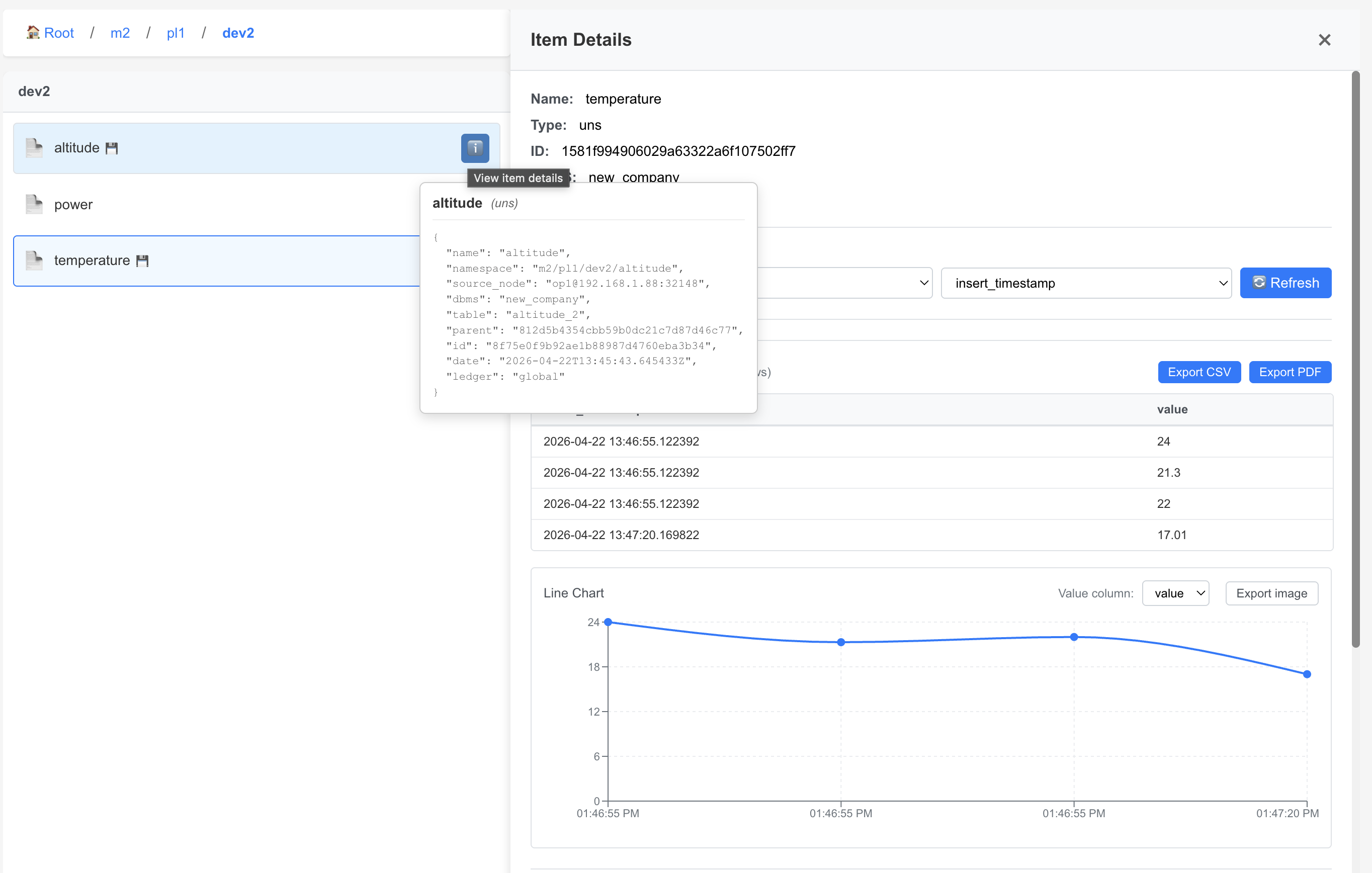
In the Remote GUI, the same dynamic hierarchy appears as a drill-down tree — for example
Root / m2 / pl1 / dev2 with leaves such as altitude, power, and temperature. Item
Details shows recent scalar samples and a chart for the selected metric. Hovering a leaf surfaces the uns
policy: namespace (for example m2/pl1/dev2/altitude), dbms (new_company), table
(altitude_2), and source_node (op1@192.168.1.88:32148), consistent with ingestion from the
operator on 192.168.1.88.
The # multi-level wildcard subscribes to every topic under M2/PL1/ (for example M2/PL1/temperature with
a scalar payload). Replace host, ports, topic prefix, dbms, and master_node with the values for your
environment (you can use master_node = !ledger_conn if that is already set in the dictionary).
| Mode | Input format | Schema required | Table | UNS generated |
|---|---|---|---|---|
| Inline mapping | Full JSON | Yes (inline) | Fixed (table=...) |
No |
| Policy mapping | Full JSON | Yes (policy) | Fixed (table=...) |
No |
dynamic=true, no column mapping |
Scalar value | No | Auto, per topic segment | Yes (auto) |
dynamic=true, with column mapping |
Full JSON | Yes (inline column.*) |
Auto, per topic | Yes (auto) |
For mapping-based ingestion, see Mapping Policy. To verify: the prior draft of this link pointed at
../06- Data Management/A- Data Ingestion/Mapping Data to
Tables.md
instead — a different path entirely. Pointed this at the Mapping Policy doc built this session since it covers the same ground, but neither path is confirmed against the current repo layout — check before shipping.
UNS Policy Structure
Whether auto-generated or user-defined, each level of the namespace hierarchy is represented as a uns policy
stored on the blockchain. Each policy captures the node’s name, its full namespace path, its level in the
hierarchy, and — at the lower levels — the database and table where the data lives.
Hierarchy levels
A typical UNS follows four levels:
| Level | Description |
|---|---|
enterprise |
Top-level organizational unit |
namespace |
A system, process, or site within the enterprise |
device |
A physical or logical device within the namespace |
sensor |
An individual measurement point on a device |
Example policies
The following shows the UNS policies generated for Enterprise C / tff / PCV7X / percent:
Enterprise level:
{
    "uns": {
        "name": "Enterprise_C",
        "namespace": "Enterprise_C",
        "id": "b992dcf093661dc3dc966c6a420ac816",
        "date": "2026-02-16T19:13:14.831323Z",
        "ledger": "global"
    }
}
Namespace level — links to a database and table:
{
    "uns": {
        "name": "tff",
        "namespace": "Enterprise_C/tff",
        "parent": "b992dcf093661dc3dc966c6a420ac816",
        "dbms": "manufacturing_historian",
        "table": "tff",
        "id": "2d8e35eaf0df9bfbdec0d112a410f24e",
        "date": "2026-02-16T19:13:33.860259Z",
        "ledger": "global"
    }
}
Device level:
{
    "uns": {
        "name": "PCV7X",
        "namespace": "Enterprise_C/tff/PCV7X",
        "parent": "2d8e35eaf0df9bfbdec0d112a410f24e",
        "dbms": "manufacturing_historian",
        "table": "tff_pcv7x",
        "id": "9a08e1c52440638803215c0c61b9d27d",
        "date": "2026-02-16T19:13:33.981368Z",
        "ledger": "global"
    }
}
Sensor level — the leaf node where data is ultimately stored:
{
    "uns": {
        "name": "percent",
        "namespace": "Enterprise_C/tff/PCV7X/percent",
        "parent": "9a08e1c52440638803215c0c61b9d27d",
        "dbms": "manufacturing_historian",
        "table": "tff_pcv7x_percent",
        "id": "5862ae8e36ad8720baea8f3d10ea31a2",
        "date": "2026-02-16T19:13:34.098449Z",
        "ledger": "global"
    }
}
Each policy links to its parent via parent (the parent policy’s id), forming a traversable tree. Because
these policies live on the blockchain, the hierarchy is immutable and consistent for any consumer — whether
that’s an analyst, a monitoring dashboard, or an AI agent — regardless of whether the underlying device has
changed its name, IP address, or hardware vendor.
The id on each policy is assigned automatically by AnyLog when the policy is signed and inserted, based on a hash of the policy’s own content. While it’s technically possible to define id yourself, it’s not recommended when working with UNS — id is the connection between layers, and parent is nothing more than a copy of the level above’s actual assigned id. If a parent value is hand-typed, guessed, or reused from another policy’s id, the UNS structure can end up broken or incomplete. From a user’s point of view, the UNS is simply its namespace hierarchy; underneath, that hierarchy exists only because each level is wired to the next through id and parent.
Why This Matters
The practical value of UNS becomes clearest when thinking about who/what is consuming the data. People are generally forgiving about data formats, but AI and automation systems perform significantly better when data is returned in a consistent, predictable structure.
AnyLog addresses this in two ways:
All data retrieval from nodes happens through SQL queries against the network. The interface is always the same regardless of what’s underneath — whether blob data stored in S3-compatible buckets or time-series data in SQLite or PostgresSQL.
The UNS lives in the metadata layer on the blockchain, which means it is guaranteed to be present and consistent for anyone querying the system. This allows both users and AI agents to reliably drill down to information about a specific device or sensor — even if that device has changed its name, IP, or manufacturer (for example, switching from a Siemens PLC to a Schneider).
Combining this with AnyLog’s decentralized architecture removes the bottleneck of routing data through a central platform, so analytics can happen where the data lives, at the speed it is being generated.