
Node-RED
Send data from Node-RED flows into AnyLog via REST POST.
Node-RED is an open-source flow-based programming tool for connecting hardware, APIs, and services visually. This guide shows how to stream timestamp/value data from a Node-RED flow into an AnyLog operator via REST POST.
Prerequisites
- Node-RED installed
- An AnyLog operator node running with REST service enabled (see Background Services)
Step 1 — Create the flow
Build a flow with these nodes:
- Inject — triggers the flow
- Function — generates the payload
- JSON — serialises the output
- HTTP request — sends the POST to AnyLog
- HTTP response — handles the reply
- Trigger — repeats every N seconds
A sample flow JSON is available in the AnyLog documentation repo.
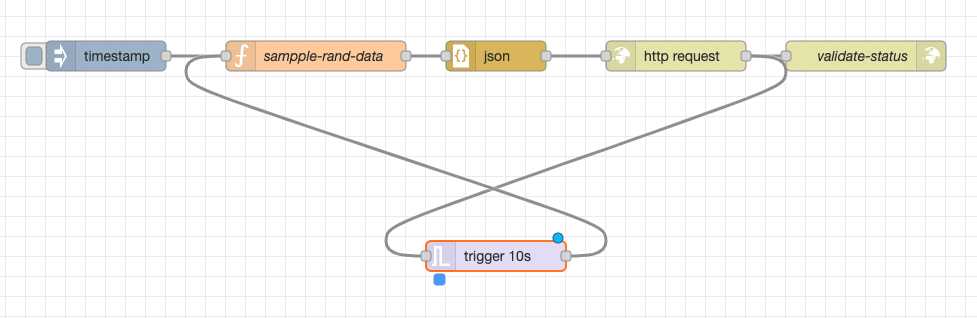
Step 2 — Write the function node
This function generates a random value with a timestamp and wraps it with a table name:
var timestamp = new Date();

var min = 1;
var max = 100;
var randomValue = Math.floor(Math.random() * (max - min + 1)) + min;

var combinedResults = {
    table: "rand_data",
    timestamp: timestamp,
    value: randomValue
};

msg.payload = combinedResults;
return msg;
Step 3 — Configure the HTTP request node
Set the method to POST with these headers:
| Header | Value |
|---|---|
command |
data |
topic |
node-red |
User-Agent |
AnyLog/1.23 |
Content-Type |
text/plain |
Set the URL to your operator’s REST endpoint: http://[operator-ip]:[rest-port]
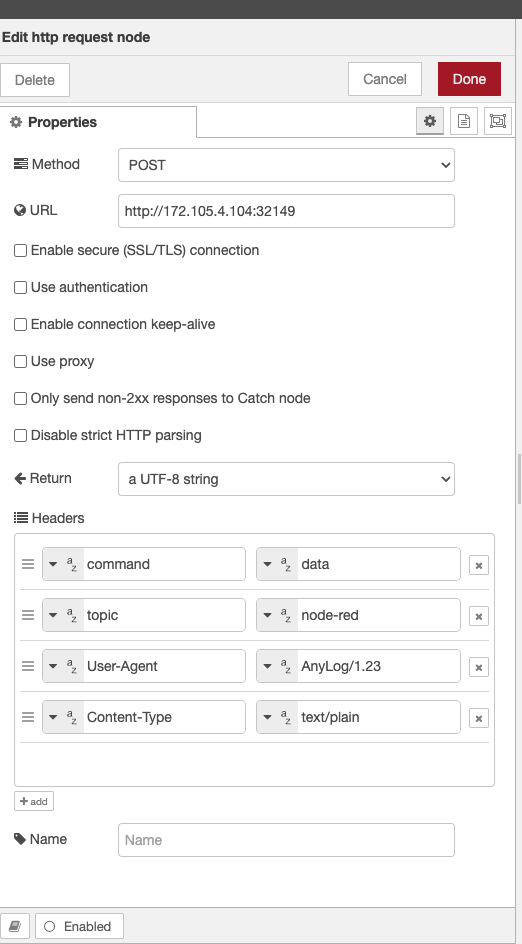
Step 4 — Configure the AnyLog operator
On the operator node, start a message client that subscribes to the node-red topic on the REST port:
<run msg client where
  broker = rest and
  port = !anylog_rest_port and
  user-agent = anylog and
  log = false and
  topic = (
    name = node-red and
    dbms = !default_dbms and
    table = "bring [table]" and
    column.timestamp.timestamp = "bring [timestamp]" and
    column.value.int = "bring [value]"
  )>
Step 5 — Run the flow and verify
Start the Node-RED flow, then query the data from a query node:
AL anylog-query +> run client () sql new_company format=table "select * from rand_data limit 15;"
[3]
AL anylog-query +>
row_id insert_timestamp           tsd_name tsd_id timestamp               value
------ -------------------------- -------- ------ ----------------------- -----
     1 2024-02-24 00:14:41.157796      131     17 2024-02-24 00:13:34.402    15
     2 2024-02-24 00:14:41.157796      131     17 2024-02-24 00:13:58.632    35
     3 2024-02-24 00:14:41.157796      131     17 2024-02-24 00:13:58.750    97
     4 2024-02-24 00:14:41.157796      131     17 2024-02-24 00:13:59.029    56
     5 2024-02-24 00:14:41.157796      131     17 2024-02-24 00:13:59.163    98
     6 2024-02-24 00:14:41.157796      131     17 2024-02-24 00:13:59.338    20
     7 2024-02-24 00:14:41.157796      131     17 2024-02-24 00:13:59.523    29
     8 2024-02-24 00:14:41.157796      131     17 2024-02-24 00:13:59.798    54
     9 2024-02-24 00:14:41.157796      131     17 2024-02-24 00:13:59.937    94
    10 2024-02-24 00:14:41.157796      131     17 2024-02-24 00:14:00.124    68
    11 2024-02-24 00:14:41.157796      131     17 2024-02-24 00:14:00.267    17
    12 2024-02-24 00:14:41.157796      131     17 2024-02-24 00:14:00.443     6
    13 2024-02-24 00:14:41.157796      131     17 2024-02-24 00:14:00.565    70
    14 2024-02-24 00:14:41.157796      131     17 2024-02-24 00:14:00.702    34
    15 2024-02-24 00:14:41.157796      131     17 2024-02-24 00:14:00.856    28

{"Statistics":[{"Count": 15,
                "Time":"00:00:00",
                "Nodes": 1}]}