
AWS Setup
support for AWS
The following provides directions for using an EC2 AWS instance(s) to configure and deploy AnyLog.
Directions for deploying an AnyLog Node
Terminology:
- Node - An AnyLog node that’s part of the network (ex. Master, Operator, Query)
- Instance - An AWS EC2 machine
Create a new AWS instance
-
Create an account and/or log into AWS
-
Create a key pair for SSH access into the node.
-
Create a new security group per node type.
The image below, shows sample configuration for an AnyLog (Operator) node; this includes SSH access, TCP and REST, as well as Broker if configured for Operator or Publisher node.
-
Master Node - Default TCP: 32048 Default REST: 32049 -
Query Node - Default TCP: 32348 Default REST: 32349 - Remote-CLI which usually seats on the same physical machine as the Query node requires port 31800 to be open.
-
Operator Node - Default TCP: 32148 Default REST: 32149 (Default) Broker: 32150 -
Publisher Node: Default TCP: 32248 Default REST: 32249 (Default) Broker: 32250 -
Generic / REST Node: Default TCP: 32548 Default REST: 32549 (Default) Broker: 32550
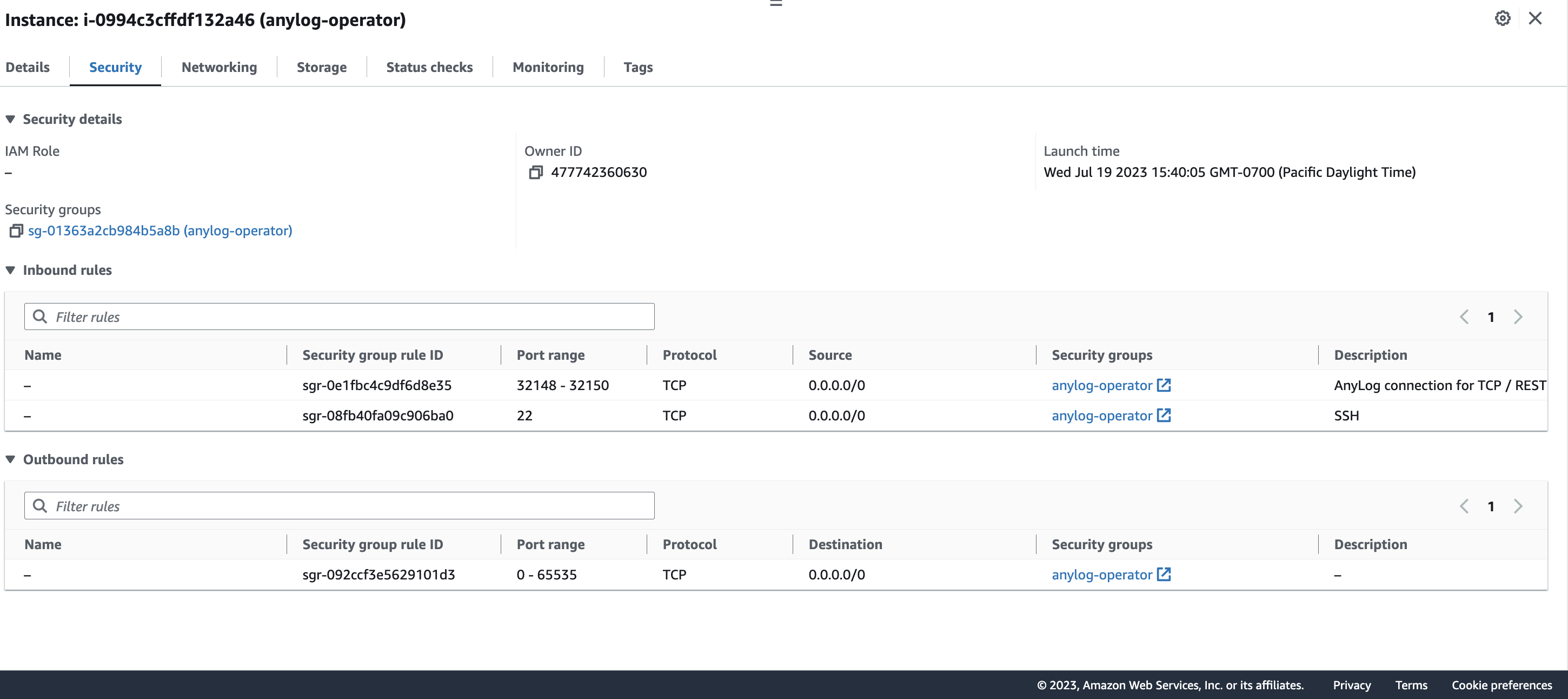
-
Create a new EC2 instance that’s associated with the corresponding security group.
-
Configure a static IP address
a. Create an Elastic IP. This is very important as AWS provides a new IP each time an instance is rebooted (unless elastic IP is configured).
-
Repeat steps 3 and 4 for each new AWS instance.
When using different regions for the AnyLog nodes, the TCP binding needs to be disabled.
Sample Config: The example shows a subsection of the anylog_configs.env file, with the TCP_BIND option disabled.
...
ANYLOG_SERVER_PORT=32048
# Port address used by AnyLog's REST protocol
ANYLOG_REST_PORT=32049
# Port value to be used as an MQTT broker, or some other third-party broker
#ANYLOG_BROKER_PORT=<NETWORKING_ANYLOG_BROKER_PORT>
# A bool value that determines if to bind to a specific IP and Port (a false value binds to all IPs)
TCP_BIND=false
...