
EdgeX Integration
Connect EdgeX Foundry — open-source or EdgeXpert — to AnyLog as a southbound data source, over MQTT or REST.
EdgeX Foundry is an open source, vendor-neutral edge computing framework under the LF Edge umbrella. It provides a southbound platform for connecting IoT devices using standard protocols including Modbus, MQTT, BACnet, SNMP, OPC-UA, REST, and more. EdgeXpert, from IoTech Systems, is a commercial edition of EdgeX with an additional browser-based management GUI for configuring application services — see Option C below if that’s what you’re running.
Integration between EdgeX (either edition) and AnyLog is achieved by configuring EdgeX to export sensor data — over MQTT or REST — to an AnyLog node, which ingests it like any other southbound source.
EdgeX version note: This guide’s Options A and B are written for open-source EdgeX 3.x/4.x (Napa / Odesa). EdgeX 4.0 uses MQTT as the default internal message bus and PostgreSQL as its default database. If you are running an older open-source release, API ports and endpoint paths will differ — see the legacy appendix at the bottom of this page if you’re on something closer to EdgeX 1.x.
Integration options
Option A — AnyLog as the MQTT broker (direct)
Configure EdgeX to publish directly to an AnyLog node running the message broker service. No third-party broker needed. The AnyLog node receiving data can be an Operator (stores data locally) or a Publisher (routes data to Operators).
EdgeX → AnyLog Message Broker → AnyLog Operator
Option B — Third-party broker
Configure EdgeX to publish to an external MQTT broker (e.g. Eclipse Mosquitto, HiveMQ), and configure AnyLog to subscribe to that broker.
EdgeX → MQTT Broker (Mosquitto / HiveMQ) → AnyLog msg client
Option C — EdgeXpert (GUI-based)
If you’re running EdgeXpert rather than open-source EdgeX, application services are configured through IoTech’s browser GUI instead of Docker Compose environment variables. Three transfer methods are available from the GUI:
- REST PUT (no transform)
- REST POST (with transform)
- Direct MQTT (with transform)
See Option C below for the full walkthrough.
Prerequisites
- Open-source EdgeX (Options A/B): deployed via Docker (see EdgeX Quick Start)
- EdgeXpert (Option C): EdgeX plus the EdgeXpert Management tool installed (see IoTech System / User Guide)
- An AnyLog node with TCP, REST, Streamer, and Operator services running — see Background Services
- For Option A: the AnyLog Message Broker service running on the receiving node
- For Option C’s REST paths: the AnyLog REST service configured — see Using REST
- For Option C’s Message Broker path: the AnyLog Message Broker service — see Message Broker
Option A — AnyLog as broker
1. Start the AnyLog message broker
On the AnyLog node that will receive EdgeX data:
<run message broker where
    external_ip = !external_ip and external_port = !anylog_broker_port and
    internal_ip = !ip and internal_port = !anylog_broker_port and
    bind = false and threads = 6>
Verify it is running:
get processes       # MSG Broker row should show Running
get local broker
2. Subscribe to the EdgeX topic
Map the incoming EdgeX event structure to an AnyLog database table. The broker=local keyword tells AnyLog to subscribe to its own broker:
<run msg client where
    broker = local and
    log = false and
    topic = (
        name = anylogEdgeX and
        dbms = edgex and
        table = "bring [device]" and
        column.timestamp.timestamp = now and
        column.value.float = "bring [readings][][value]" and
        column.name.str = "bring [readings][][name]"
    )>
Verify the subscription:
get msg clients
3. Configure EdgeX to publish to AnyLog
In your EdgeX deployment, add an application service (app-service-configurable) configured to export events to your AnyLog broker address. In your docker-compose.override.yml:
app-mqtt-export:
  container_name: edgex-app-mqtt-export
  environment:
    EDGEX_PROFILE: mqtt-export
    EDGEX_SECURITY_SECRET_STORE: "false"
    SERVICE_HOST: edgex-app-mqtt-export
    WRITABLE_PIPELINE_FUNCTIONS_MQTTEXPORT_PARAMETERS_BROKERADDRESS: tcp://[anylog-node-ip]:[broker-port]
    WRITABLE_PIPELINE_FUNCTIONS_MQTTEXPORT_PARAMETERS_TOPIC: anylogEdgeX
    WRITABLE_PIPELINE_FUNCTIONS_MQTTEXPORT_PARAMETERS_CLIENTID: edgex-anylog
  image: nexus3.edgexfoundry.org:10004/app-service-configurable:latest
  networks:
    edgex-network:
Replace [anylog-node-ip] and [broker-port] with your AnyLog node’s IP and broker port (default 32550).
Option B — Third-party broker
1. Configure EdgeX to publish to the broker
Add an MQTT export application service to your EdgeX compose file pointing to your third-party broker:
app-mqtt-export:
  container_name: edgex-app-mqtt-export
  environment:
    EDGEX_PROFILE: mqtt-export
    EDGEX_SECURITY_SECRET_STORE: "false"
    SERVICE_HOST: edgex-app-mqtt-export
    WRITABLE_PIPELINE_FUNCTIONS_MQTTEXPORT_PARAMETERS_BROKERADDRESS: tcp://[broker-ip]:[broker-port]
    WRITABLE_PIPELINE_FUNCTIONS_MQTTEXPORT_PARAMETERS_TOPIC: edgex-events
    WRITABLE_PIPELINE_FUNCTIONS_MQTTEXPORT_PARAMETERS_CLIENTID: edgex-export
  image: nexus3.edgexfoundry.org:10004/app-service-configurable:latest
  networks:
    edgex-network:
2. Subscribe AnyLog to the broker
<run msg client where
    broker = [broker-ip] and
    port = [broker-port] and
    user = [user] and
    password = [password] and
    log = false and
    topic = (
        name = edgex-events and
        dbms = edgex and
        table = "bring [device]" and
        column.timestamp.timestamp = now and
        column.value.float = "bring [readings][][value]" and
        column.name.str = "bring [readings][][name]"
    )>
Option C — EdgeXpert (GUI-based)
This option applies to EdgeXpert, IoTech’s commercial edition of EdgeX with a browser management GUI. The example data source below (retail-1) is a sample provided by IoTech.
{
  "apiVersion":"v2",
  "id":"ff3013c3-2f96-48b6-ac06-5eeb4cde1ecf",
  "deviceName":"retail-device-1",
  "profileName":"RetailVirtualDevice",
  "sourceName":"FreezerTemp1",
  "origin":1694737678685722461,
  "readings":[{
    "id":"000a2227-0ff8-4534-8131-310a7efcdd47",
    "origin":1694737678685722461,
    "deviceName":"retail-device-1",
    "resourceName":"FreezerTemp1",
    "profileName":"RetailVirtualDevice",
    "valueType":"Float32",
    "units":"F",
    "value":"3.140839e+01"
  }]
}
{
  "apiVersion":"v2",
  "id":"e60989ad-ab59-456e-bb00-b90518ca83e1",
  "deviceName":"retail-device-1",
  "profileName":"RetailVirtualDevice",
  "sourceName":"PeopleCount",
  "origin":1694737678704913648,
  "readings":[{
    "id":"e789d093-0392-4a4e-9890-eee615f647f2",
    "origin":1694737678704913648,
    "deviceName":"retail-device-1",
    "resourceName":"PeopleCount",
    "profileName":"RetailVirtualDevice",
    "valueType":"Int32",
    "value":"48"
  }]
}
Note: this payload shape (
apiVersion,sourceName,resourceName) is EdgeXpert’s v2 API and differs from the open-source EdgeX event shape shown under Data mapping notes below (device,readings[].name). Map against whichever shape your actual deployment sends — don’t assume the two are interchangeable.
Logging into EdgeXpert
- URL:
https://${YOUR_IP}:9090 -
Username: adminPassword: admin
From the left-side menu, go to App Services:
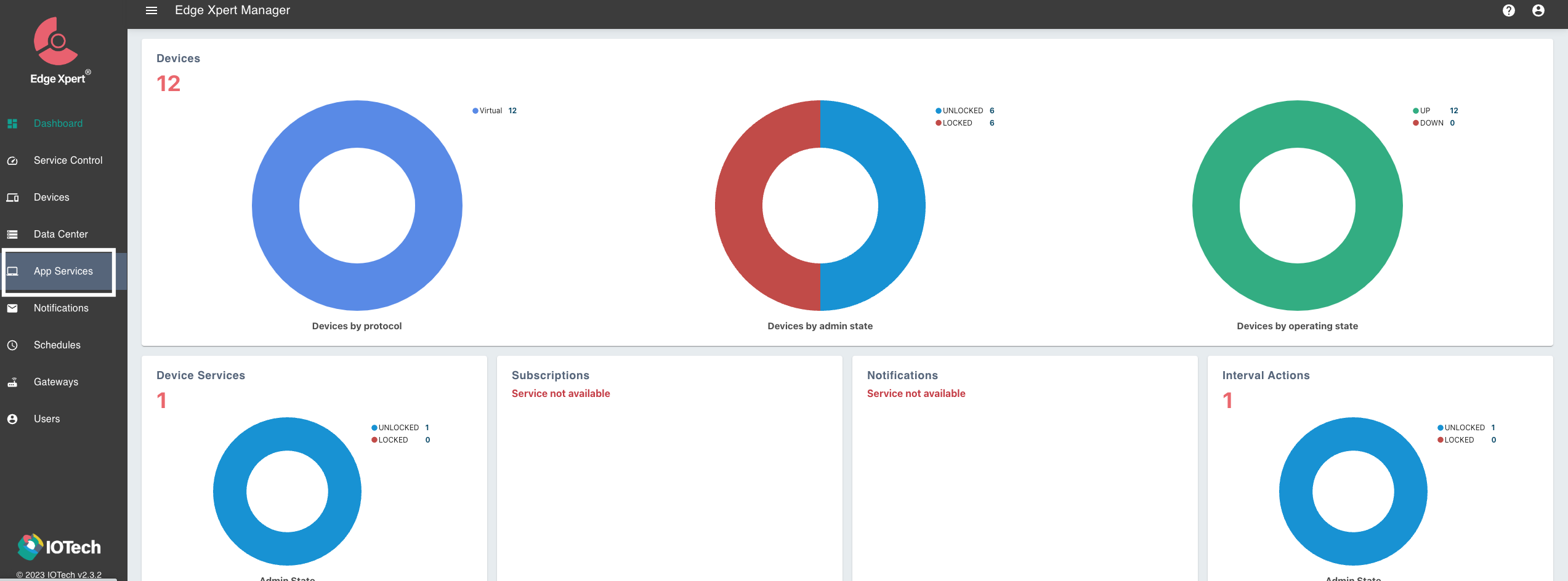
…then add a Basic Service from the right-side panel. The three transfer methods below all start from this same Basic Service creation screen — what differs is how you configure it from there.

Transferring data from EdgeX to AnyLog
EdgeXpert can transfer data into AnyLog using three methods:
- REST PUT — receives data without transformation; the database/table are fixed in the REST headers.
- REST POST — receives data with transformation; database/table can come from headers or be derived from the data itself via mapping rules.
- AnyLog Message Broker — transformation supported, delivered over MQTT instead of REST.
AnyLog can also be configured to receive data from third-party brokers (CloudMQTT, Eclipse Mosquitto, etc.) — the same pattern as Option B above.
Method 1: REST PUT (no transformation)
Configuration is done entirely on the EdgeXpert side; AnyLog just needs its REST service running with no mapping rules. The database and table are specified in the REST headers, not derived from the data.
On your own machine, create a JavaScript transform that extracts the reading value EdgeXpert will send — a sample script is available:
// file name: edgex_transformation.js
var outputObject = { value: inputObject.readings[0] };
return outputObject;
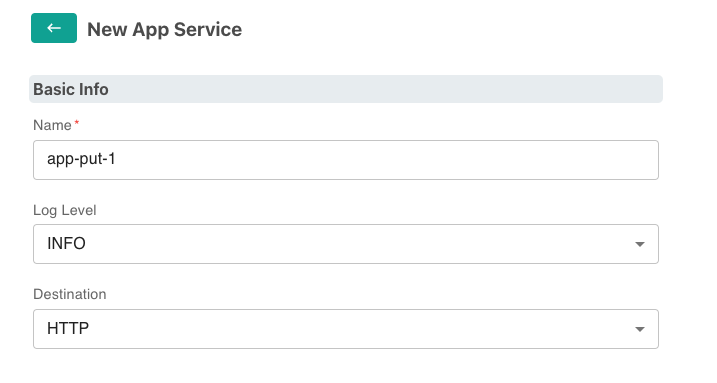
In the EdgeXpert GUI, configure the Basic App Service:
- Basic Info — Name; Destination: HTTP
- Address Info — Method: PUT; URL (your AnyLog node’s REST IP:port); headers:
type: json,dbms: <database>,table: <table>,mode: streaming,Content-Type: text/plain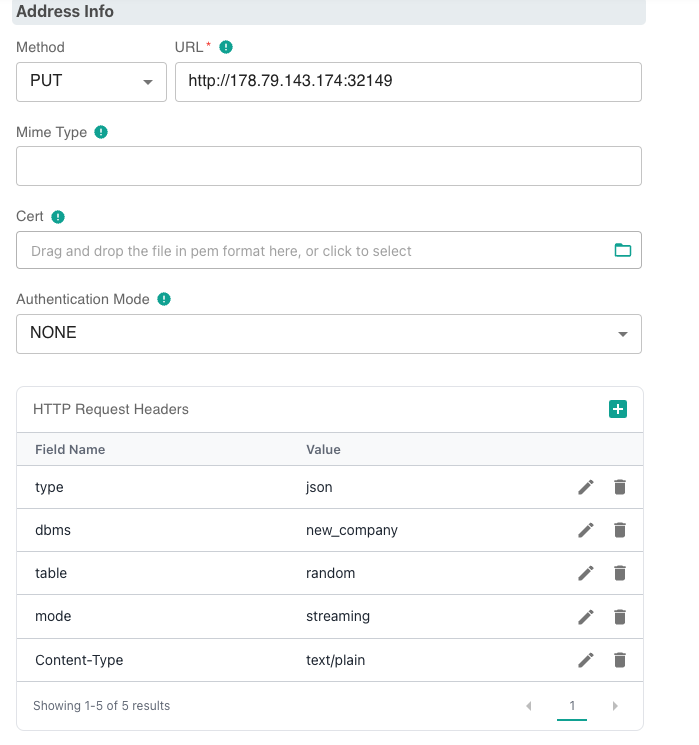
- Data Format — JavaScript Transform:
edgex_transformation.js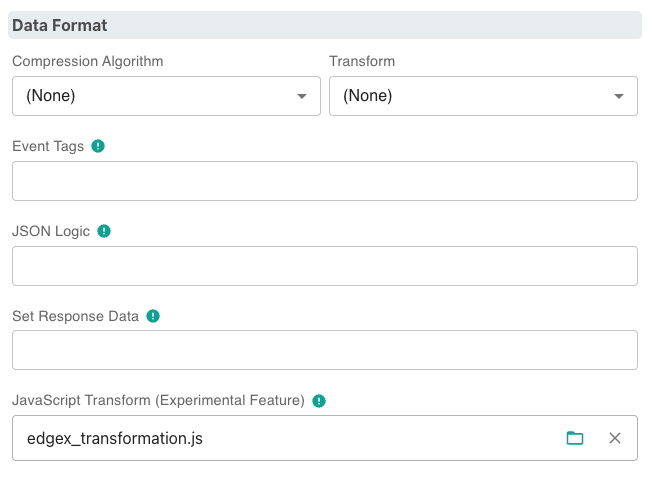
- Filter — Device Filter, as needed
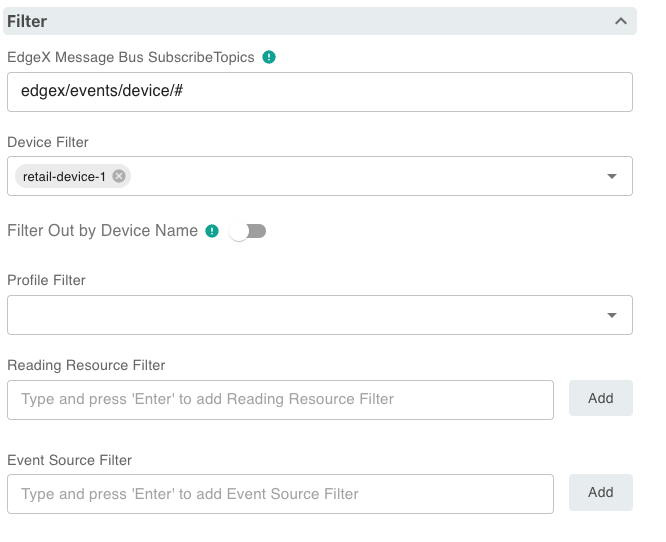
Save the service ( ); data should begin flowing into AnyLog via PUT.
Method 2: REST POST (with transformation)
Here the transformation happens on the AnyLog side via mapping rules attached to a topic, and the database/table can be derived from the incoming data itself rather than fixed in the headers. This uses the same underlying mechanism as running AnyLog as a message broker — mapping rules declared via a client service.
On the AnyLog operator node receiving the data, declare the mapping rules and start the client service:
<run mqtt client where broker=rest and user-agent=anylog and log=false and topic=(
  name=anylogedgex-post and
  dbms=!company_name.name and
  table="bring [readings][0][resourceName]" and
  column.timestamp.timestamp=now and
  column.value=(type=float and value="bring [readings][0][value]"))>
Command name and syntax flagged, not corrected: this example uses
run mqtt clientand thecolumn.x=(type=... and value=...)mapping form, both as given in the original source. The rest of this page (Options A/B) usesrun msg clientandcolumn.x.type = "bring [...]"instead. These may be equivalent aliases/forms, or one may be outdated — confirm against the actual command reference before relying on this exact syntax.
In the EdgeXpert GUI, configure the Basic App Service:
- Basic Info — Name; Destination: HTTP
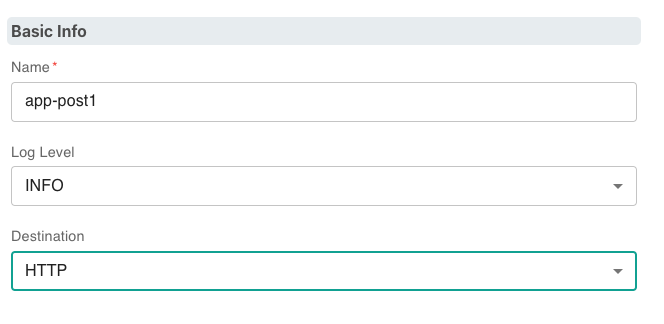
- Address Info — Method: POST; URL (your AnyLog node’s REST IP:port); headers:
command: data,topic: anylogedgex-post,User-Agent: AnyLog/1.23,Content-Type: text/plain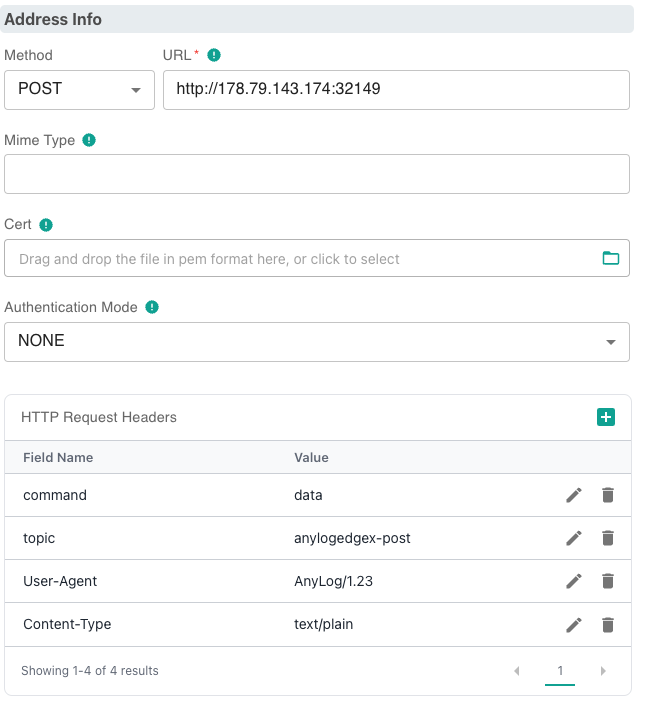
- Filter — Device Filter, as needed
Save the service; data should begin flowing into AnyLog via POST.
Method 3: AnyLog Message Broker (with transformation)
Same mapping-rule mechanism as Method 2, but delivered over MQTT to AnyLog’s own broker rather than over REST. The mapping rules must include the database and table, since there are no REST headers to supply them.
<run mqtt client where broker=local and log=false and topic=(
  name=anylogedgex-mqtt and
  dbms=!default_dbms and
  table="bring [readings][0][resourceName]" and
  column.timestamp.timestamp=now and
  column.value=(type=float and value="bring [readings][0][value]"))>
(The same command-name/syntax caveat from Method 2 applies here.)
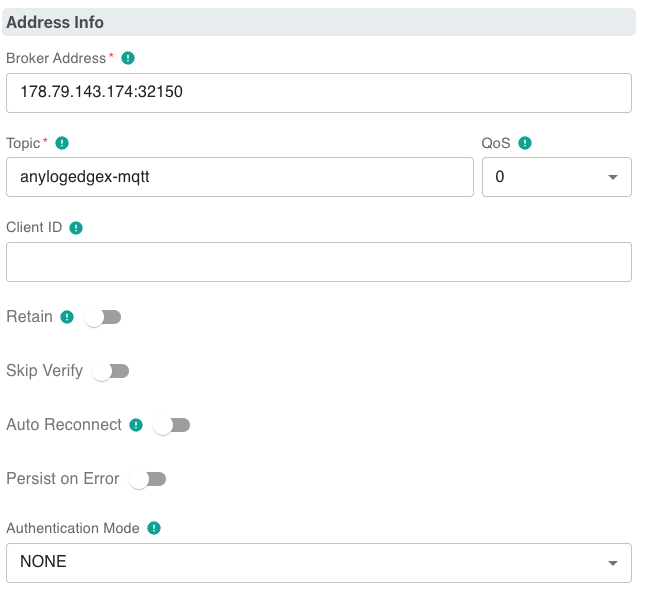
In the EdgeXpert GUI, configure the Basic App Service:
- Basic Info — Name; Destination: MQTT
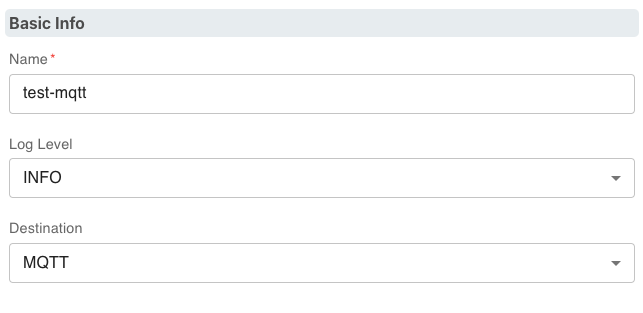
- Address Info — URL (your AnyLog node’s Message Broker IP:port); Topic
- Filter — Device Filter, as needed
Save the service; data should begin flowing into AnyLog via the message broker.
Verifying data flow
Check EdgeX is running and producing readings
# List devices (EdgeX v2/v3/v4 API)
curl http://localhost:59881/api/v3/device/all | jq

# View recent readings
curl http://localhost:59880/api/v3/reading/all?limit=10 | jq
Check AnyLog is receiving data
get msg clients                    # subscription status
get streaming                      # buffer status
get operator                       # ingestion status
get rows count where dbms = edgex  # confirm rows are landing
Query the data:
run client () sql edgex format=table "select * from rand_data limit 10"
Data mapping notes
Open-source EdgeX (Options A/B) publishes events in this structure:
{
  "device": "my-sensor",
  "origin": 1700000000,
  "readings": [
    {
      "name": "temperature",
      "value": "23.5",
      "origin": 1700000000
    }
  ]
}
The bring expressions in the run msg client command extract values from this structure:
| AnyLog column | Mapping | Notes |
|---|---|---|
table |
bring [device] |
Uses the device name as the table name |
timestamp |
now |
Uses AnyLog ingestion time |
value |
bring [readings][][value] |
First reading value |
name |
bring [readings][][name] |
First reading name |
Adjust the mapping to match the actual structure of your EdgeX device readings. EdgeXpert’s event structure
(Option C) uses different field names (deviceName, sourceName, resourceName) — see the payload example
under Option C rather than reusing this table for that path.
Deploying EdgeX
For a quick local open-source EdgeX deployment using the EdgeX compose builder:
git clone https://github.com/edgexfoundry/edgex-compose.git
cd edgex-compose/compose-builder

# Generate a compose file with MQTT support and no security (for dev/test)
make gen no-secty mqtt-broker ui

# Start EdgeX
docker compose up -d

# Verify services are running
docker ps
See the EdgeX Quick Start for full deployment instructions. EdgeXpert deployment is a separate, commercial process — see IoTech System / User Guide.
Appendix — Legacy EdgeX 1.3.1 Complete Example
This is a concrete deployment log against EdgeX 1.3.1 — several major versions behind current EdgeX — using the
AnyLog-co/lfedge-code demo repo and the deprecated v1 reading API (/api/v1/reading). Treat it as a snapshot of
an older release rather than current guidance: Options A/B above cover the same integration goal against current
EdgeX using the supported edgex-compose deployment path, and are the ones to follow for a new deployment.
The demo uses EdgeX’s random data generator, with data sent over its app-service-mqtt. Fields that change between
deployments are set in bold below.
Steps
- Clone lfedge-code:
git clone https://github.com/AnyLog-co/lfedge-code cd lfedge-code/edgex - Update configurations in the .env file:
- Update the MQTT params to match the credentials on your AnyLog operator node (e.g.
anylog-operator-node1):MQTT_TOPIC=anylogedgex MQTT_IP_ADDRESS=10.0.0.50 MQTT_PORT=32150 MQTT_USER="" MQTT_PASSWORD="" - If you’re on ARM64, update the
ARCHvalue on line 27:# default amd64 machine ARCH="" # update to arm64 machine ARCH=-arm64
- Update the MQTT params to match the credentials on your AnyLog operator node (e.g.
- Start the EdgeX instance:
cd lfedge-code/edgex
docker-compose up -d
Validate Deployment
- Confirm nothing crashed:
docker ps -a | grep edgexroot@edgex-operator2:~# docker ps -a | grep edgex a13b169023b7 emqx/kuiper:1.1.1-alpine "/usr/bin/docker-ent…" 45 hours ago Up 44 hours 127.0.0.1:20498->20498/tcp, 9081/tcp, 127.0.0.1:48075->48075/tcp edgex-kuiper 56a3482bdfc8 edgexfoundry/docker-sys-mgmt-agent-go:1.3.1 "/sys-mgmt-agent -cp…" 45 hours ago Up 44 hours 127.0.0.1:48090->48090/tcp edgex-sys-mgmt-agent 2740875f17a4 edgexfoundry/docker-app-service-configurable:1.3.1 "/app-service-config…" 45 hours ago Up 44 hours 48095/tcp, 127.0.0.1:48101->48101/tcp edgex-app-service-configurable-mqtt 32b749bbd104 edgexfoundry/docker-device-random-go:1.3.1 "/device-random --cp…" 45 hours ago Up 44 hours 127.0.0.1:49988->49988/tcp edgex-device-random e960f5ff00c5 edgexfoundry/docker-app-service-configurable:1.3.1 "/app-service-config…" 45 hours ago Up 44 hours 48095/tcp, 127.0.0.1:48100->48100/tcp edgex-app-service-configurable-rules e50c8de4b879 edgexfoundry/docker-device-modbus-go:1.3.1 "/device-modbus --cp…" 45 hours ago Up 44 hours 127.0.0.1:49991->49991/tcp edgex-device-modbus e91cd4ad63fa edgexfoundry/docker-core-command-go:1.3.1 "/core-command -cp=c…" 45 hours ago Up 44 hours 127.0.0.1:48082->48082/tcp edgex-core-command 59464a3a976d edgexfoundry/docker-core-data-go:1.3.1 "/core-data -cp=cons…" 45 hours ago Up 44 hours 127.0.0.1:5563->5563/tcp, 127.0.0.1:48080->48080/tcp edgex-core-data b706d9584413 edgexfoundry/docker-core-metadata-go:1.3.1 "/core-metadata -cp=…" 45 hours ago Up 44 hours 127.0.0.1:48081->48081/tcp edgex-core-metadata 13abb3559d2a edgexfoundry/docker-support-notifications-go:1.3.1 "/support-notificati…" 45 hours ago Up 44 hours 127.0.0.1:48060->48060/tcp edgex-support-notifications ff7d350ca3ba edgexfoundry/docker-support-scheduler-go:1.3.1 "/support-scheduler …" 45 hours ago Up 44 hours 127.0.0.1:48085->48085/tcp edgex-support-scheduler 0346e264f6d6 edgexfoundry/docker-edgex-consul:1.3.0 "edgex-consul-entryp…" 45 hours ago Up 44 hours 8300-8302/tcp, 8400/tcp, 8301-8302/udp, 8600/tcp, 8600/udp, 127.0.0.1:8500->8500/tcp edgex-core-consul fab7cbdcc29f redis:6.0.9-alpine "docker-entrypoint.s…" 45 hours ago Up 44 hours 127.0.0.1:6379->6379/tcp edgex-redis f135b724626e nexus3.edgexfoundry.org:10003/edgex-devops/edgex-modbus-simulator:latest "/simulator" 45 hours ago Up 44 hours 127.0.0.1:1502->1502/tcp edgex-modbus-simulator - Confirm data is coming in:
curl http://127.0.0.1:48080/api/v1/reading 2> /dev/null[ { "id": "000767a3-61bb-49e1-93ff-be4695eb5b43", "created": 1659412501505, "origin": 1659412501498780400, "device": "Random-Integer-Generator01", "name": "RandomValue_Int16", "value": "10380", "valueType": "Int16" }, { "id": "000797b4-736b-48b9-bbe5-09594be7099f", "created": 1659403221133, "origin": 1659403221133020700, "device": "Random-Integer-Generator01", "name": "RandomValue_Int32", "value": "771919435", "valueType": "Int32" }, { "id": "00079ae9-340a-4d70-9e0b-9a5a8b48e216", "created": 1659412541467, "origin": 1659412541463869400, "device": "Random-Integer-Generator01", "name": "RandomValue_Int8", "value": "27", "valueType": "Int8" }, { "id": "0008d23e-7640-4974-aaeb-179e375566cb", "created": 1659425642023, "origin": 1659425642019472400, "device": "Random-Integer-Generator01", "name": "RandomValue_Int8", "value": "-87", "valueType": "Int8" }, { "id": "000f547c-25b7-4d96-b862-67467345a74c", "created": 1659461623534, "origin": 1659461623530927000, "device": "Random-Integer-Generator01", "name": "RandomValue_Int8", "value": "-49", "valueType": "Int8" }, ... ]