
Unified Namespace
How AnyLog generates and manages a Unified Namespace (UNS) for operational data
AnyLog’s Unified Namespace (UNS) provides a logical, hierarchical view of distributed operational data.
The UNS does not require the underlying data to be reorganized, moved, or centralized. Instead, AnyLog uses metadata policies to map logical objects and relationships to operational data that remains distributed across edge nodes, databases, historians, brokers, devices, and other systems.
In AnyLog, the logical organization of data is decoupled from its physical organization. Operational data remains distributed where it is managed, while the metadata layer describes where the data is located, how it can be accessed, and how it is presented through logical views such as the UNS.
This separates two important concepts:
- Physical data organization — Operational data is distributed across AnyLog Operator nodes. Data streamed to these nodes is managed locally and does not need to be moved to or maintained in a centralized data store.
- Logical data organization — Defined by the metadata layer. The metadata describes the data and its relationships independently of where it is physically stored, allowing users, applications, and AI agents to navigate, understand, and access distributed data through a unified logical view.
As a result, the same distributed operational data can be represented through one or more logical hierarchies without changing the underlying systems.
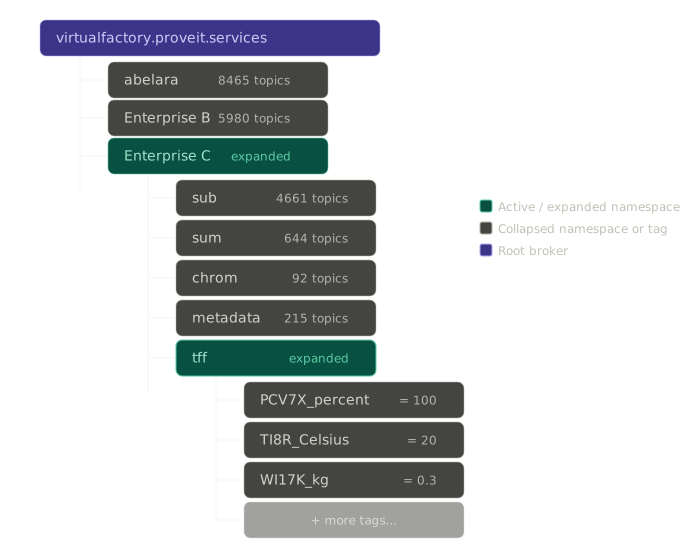
UNS Policies and Object Policies
AnyLog separates what an object is from where that object appears in a logical namespace.
These concepts are represented using two types of metadata policies:
- Object policies describe an object and its attributes — for example, a site, production line, machine, device, sensor, process, or other physical or logical asset.
- UNS policies define the logical namespace and the relationships that place objects within that hierarchy.
This separation allows an object to be described independently of a particular hierarchy and allows the same operational data to participate in different logical views.
By traversing these metadata relationships, AnyLog reconstructs the complete asset hierarchy and exposes it as a navigable UNS while the operational data remains distributed across edge systems, databases, historians, and devices.
Creating a UNS
AnyLog supports three complementary ways to create a Unified Namespace. These methods can be used independently or together.
1. User-Defined UNS
Users can explicitly define the hierarchy using metadata policies.
For example:
Enterprise
└── Site
    └── Production Line
        └── Machine
            └── Sensor
The hierarchy can follow a standard such as ISA-95 or any structure appropriate for the application.
This allows organizations to model operational data according to their business, engineering, or application requirements rather than being restricted by the physical organization of the source systems.
For examples of manually defined UNS policies, see Custom UNS.
2. UNS from Existing Structures
AnyLog can derive the UNS from structures already present in operational systems and data streams.
Examples include:
- OPC-UA object hierarchies
- MQTT topic structures
- Broker topic hierarchies
- Device and sensor paths
- Existing mappings and source metadata
For example, an MQTT topic such as:
M2/PL1/DEV1/power
already contains a hierarchy:
M2
└── PL1
    └── DEV1
        └── power
AnyLog can use this existing structure to create the corresponding UNS metadata automatically.
3. AI-Generated UNS
AI can analyze available metadata, schemas, names, mappings, and operational structures and generate or extend the logical UNS.
This is particularly useful when operational data comes from multiple systems with different naming conventions or organizational models.
The resulting hierarchy is represented using the same AnyLog metadata policies as a user-defined or automatically derived UNS. AI is therefore another mechanism for creating and maintaining the metadata model rather than a separate UNS implementation.
Dynamic UNS from Incoming Data
One way AnyLog derives a UNS from an existing structure is during data ingestion.
When dynamic=true is configured for an incoming MQTT stream, AnyLog uses the incoming topic hierarchy to dynamically create the corresponding tables and UNS metadata.
Because new metadata policies are generated, master_node=!ledger_conn identifies the Master Node to which those policies are published.
Scalar Values
When no column.* mapping is provided, each incoming message carries a single scalar value. The MQTT topic path provides the hierarchy.
For example:
<run msg client where
    broker = 192.168.1.88 and port = 1883 and
    master_node = !ledger_conn and
    topic = (
        name = M2/PL1/# and
        dbms = new_company and
        dynamic = true
    )>
Messages published to:
M2/PL1/DEV1/power
M2/PL1/DEV1/active
M2/PL1/DEV1/status
produce a hierarchy such as:
M2
└── PL1
    └── DEV1
        ├── power
        ├── active
        └── status
For testing with a Mosquitto broker:
mosquitto_pub -p 1883 -h 192.168.1.88 -m 98.3 -t M2/PL1/DEV1/power
mosquitto_pub -p 1883 -h 192.168.1.88 -m 1 -t M2/PL1/DEV1/active
mosquitto_pub -p 1883 -h 192.168.1.88 -m "stopped" -t M2/PL1/DEV1/status
JSON Payloads with Column Mapping
If an incoming message contains multiple fields, dynamic=true can be combined with column mapping.
For example:
<run msg client where
    broker=local and
    master_node=!ledger_conn and
    log=false and
    topic=(
        name=my-data and
        dbms="bring [dbms]" and
        dynamic=true and
        column.timestamp.timestamp="bring [timestamp]" and
        column.value.float="bring [value]"
    )>
In this case, AnyLog dynamically determines and creates the table while the column.* definitions determine how fields in the incoming JSON are mapped into that table.
For a detailed example of extending the incoming topic with application-specific table information, see Dynamic Ingestion with Custom UNS.
Viewing a Dynamic UNS
The AnyLog GUI exposes the generated metadata as a navigable hierarchy.
For example, a dynamically generated hierarchy may appear as Root / m2 / pl1 / dev2, with measurements such as altitude, power, and temperature.
Selecting a measurement provides access to its data, while the associated uns policy identifies information such as its namespace, database, table, and source node.
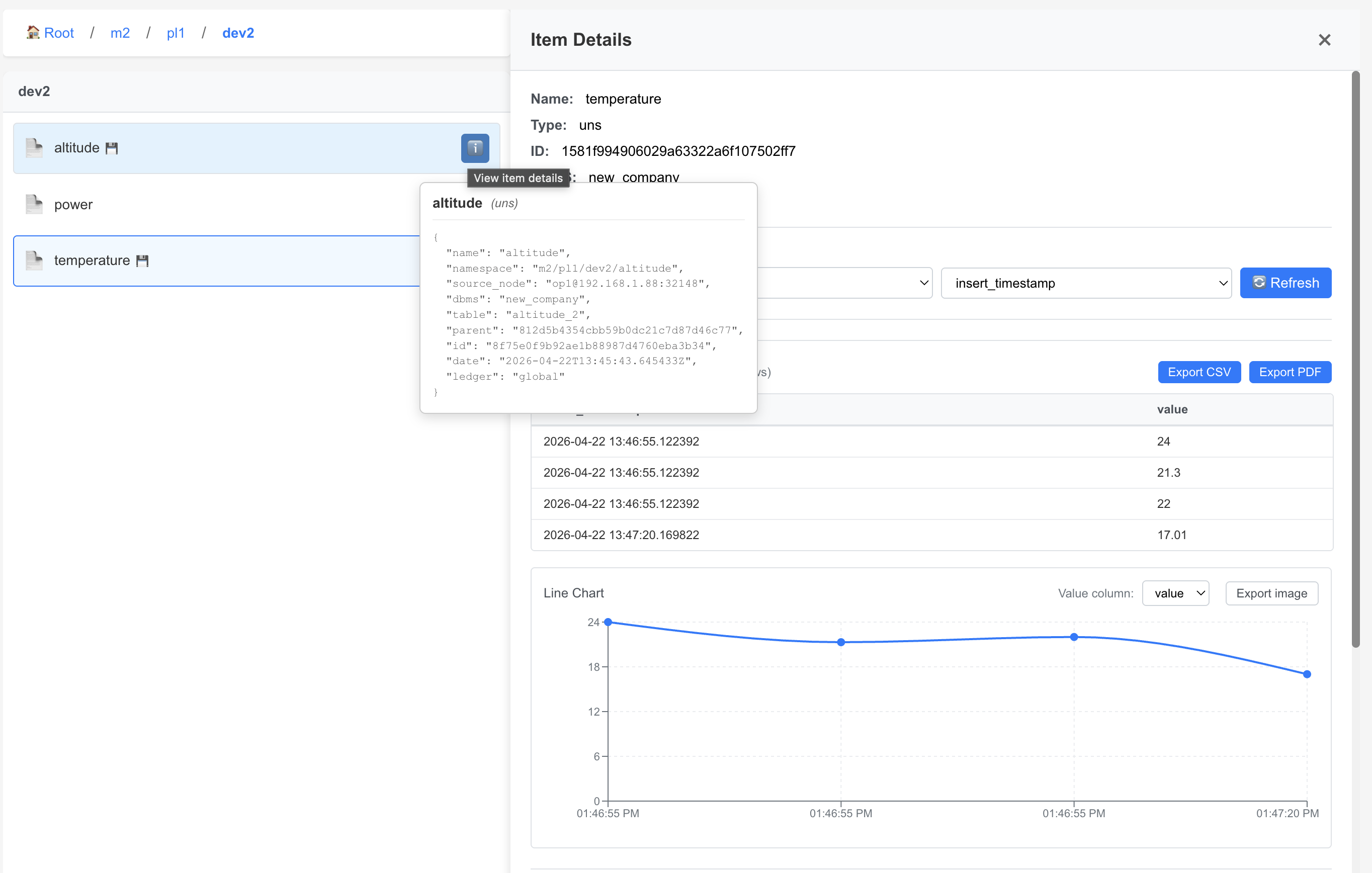
The UNS therefore provides navigation and context while the underlying operational data continues to reside on the operator nodes.
UNS Policy Structure
The logical hierarchy is represented using uns metadata policies.
A UNS policy can identify:
- the object’s name,
- its complete namespace path,
- its parent in the hierarchy,
- and, where applicable, the database and table associated with the operational data.
For example, the following policies represent the hierarchy:
Enterprise_C / tff / PCV7X / percent
Enterprise
{
  "uns": {
    "name": "Enterprise_C",
    "namespace": "Enterprise_C",
    "id": "b992dcf093661dc3dc966c6a420ac816",
    "date": "2026-02-16T19:13:14.831323Z",
    "ledger": "global"
  }
}
Namespace
{
  "uns": {
    "name": "tff",
    "namespace": "Enterprise_C/tff",
    "parent": "b992dcf093661dc3dc966c6a420ac816",
    "dbms": "manufacturing_historian",
    "table": "tff",
    "id": "2d8e35eaf0df9bfbdec0d112a410f24e",
    "date": "2026-02-16T19:13:33.860259Z",
    "ledger": "global"
  }
}
Device
{
  "uns": {
    "name": "PCV7X",
    "namespace": "Enterprise_C/tff/PCV7X",
    "parent": "2d8e35eaf0df9bfbdec0d112a410f24e",
    "dbms": "manufacturing_historian",
    "table": "tff_pcv7x",
    "id": "9a08e1c52440638803215c0c61b9d27d",
    "date": "2026-02-16T19:13:33.981368Z",
    "ledger": "global"
  }
}
Sensor
{
  "uns": {
    "name": "percent",
    "namespace": "Enterprise_C/tff/PCV7X/percent",
    "parent": "9a08e1c52440638803215c0c61b9d27d",
    "dbms": "manufacturing_historian",
    "table": "tff_pcv7x_percent",
    "id": "5862ae8e36ad8720baea8f3d10ea31a2",
    "date": "2026-02-16T19:13:34.098449Z",
    "ledger": "global"
  }
}
The parent attribute references the id of the policy above it, creating a traversable hierarchy.
AnyLog assigns the policy id automatically when the policy is prepared or inserted. Because parent references these IDs, users should normally allow AnyLog to assign them rather than manually creating IDs.
Accessing Distributed Data
The UNS and SQL provide two complementary ways to access the same distributed operational data.
Users and applications can query the distributed data directly through SQL, or navigate the data through the logical UNS hierarchy.
                 Users / Applications / AI
                           │
                ┌──────────┴──────────┐
                │                     │
               SQL                   UNS
                │                     │
                └──────────┬──────────┘
                           │
                  Distributed Data
Both approaches operate on the same underlying data.
SQL provides direct analytical access, while the UNS provides contextual navigation through logical assets and relationships.
The UNS therefore adds organization and context without requiring the operational data to be duplicated or centralized.
Multiple Logical Views
Because the UNS is defined through metadata rather than by the physical organization of the data, the same operational data can participate in multiple logical views.
For example, a pump could appear in a physical hierarchy:
Enterprise
└── Site A
    └── Line 2
        └── Pump 101
and also in an equipment-oriented hierarchy:
Equipment
└── Pumps
    └── Centrifugal Pumps
        └── Pump 101
Both hierarchies can reference the same underlying operational data.
This allows the logical organization of the data to evolve without restructuring databases, changing ingestion pipelines, or moving the operational data.
Why This Matters
AnyLog separates the logical organization of operational data from its physical organization and location.
Operational data can remain distributed across edge systems, databases, historians, brokers, and devices while the metadata provides a common description of:
- what objects exist,
- how those objects relate to one another,
- where their data is located,
- and how users, applications, and AI agents can access it.
The UNS provides the contextual navigation layer over this distributed environment, while AnyLog’s distributed query capabilities provide direct access to the underlying data.
Together, they provide a unified view of operational data and context without requiring the data to be centralized.