
Broker Setup TLS Example
Full MQTT broker mTLS walkthrough — create CA and server/user certificates, start TLS broker, publish with client certs, optional CA on blockchain.
Configure MQTT TLS and authentication
Full worked example for securing AnyLog’s MQTT message broker with TLS and optional client certificates (mTLS). For the shorter overview, see MQTT Message Broker — MQTT over TLS and mTLS.
Create CA Authority for self signed TLS certificates
<id generate certificate authority where country = US and
  state = CA and locality = "Redwood City" and
  org = MQTT_CA_TLS and
  output_name = "MQTT_CA_TLS" and
  expiration_days = 3650
>
Create certificate request
<id generate certificate request where country = US and state = CA and locality = "Redwood City"
  and org = "Anylog MQTT broker TLS"
  and hostname = op1
  and alt_name = 192.168.1.60
  and ip = 192.168.1.60 and
  output_name = "server-mqtt-op1"
>
Sign certificate with above CA
<id sign certificate request where ca_org = MQTT_CA_TLS and ca_output_name = "MQTT_CA_TLS"
  and server_org = "Anylog MQTT broker TLS" and output_name = "server-mqtt-op1"
  and expiration_days = 3650
>
Writes under !pem_dir: MQTT_CA_TLS.crt / .key, server-mqtt-op1.csr / .key / .pem, then server-mqtt-op1.crt.
Notes:
- The server certificate requires IP address(es) and/or a domain name, for example:
IPAddress:192.168.1.60DNS:localhost
- All commands in this self-signed walkthrough are issued on an operator node, say
op1. - Optional: if the CA private key must stay on a remote master (not on this operator), sign with
certificate_authority = !master_nodeinstead of a local CA key. See Optional: remote signing with a master. Remote master signing is not required for this walkthrough.
Create user certificates for an organization
If the organization that wants to connect to the AnyLog MQTT TLS broker does not have user certificates, create them and pass the following to the organization:
user*.crt/user*.key(one pair per user; CN matchesallowed_users, e.g.user1,user2)MQTT_CA_TLS.crt(broker TLS CA public key — so the client can trust the broker)
Do not share any other private key with the organization.
Example on the operator:
<id generate certificate authority where country = US and
  state = CA and locality = "Redwood City" and
  org = MQTT_CA_users and
  output_name = "MQTT_CA_users" and
  hostname = MQTT_CA_users and
  expiration_days = 3650
>

<id generate certificate request where country = US and state = CA and locality = "Redwood City"
  and org = AnyLog and hostname = user1 and output_name = "user1"
>

<id sign certificate request where ca_org = MQTT_CA_users and ca_output_name = "MQTT_CA_users"
  and server_org = AnyLog and output_name = "user1" and expiration_days = 825
>

<id generate certificate request where country = US and state = CA and locality = "Redwood City"
  and org = AnyLog and hostname = user2 and output_name = "user2"
>

<id sign certificate request where ca_org = MQTT_CA_users and ca_output_name = "MQTT_CA_users"
  and server_org = AnyLog and output_name = "user2" and expiration_days = 825
>
Writes under !pem_dir: MQTT_CA_users.crt / .key, plus user1 / user2 .csr / .key / .crt.
Give the organization: user1.crt / user1.key, user2.crt / user2.key, and MQTT_CA_TLS.crt only. Keep all other keys and CA material on the AnyLog side.
Start MQTT broker
Start the broker with the certificate files written above (!pem_dir is typically ./data/pem):
<run message broker where external_ip = 192.168.1.60 and external_port = 8883 and threads = 6
  and enable_tls = true
  and tls_cert = !pem_dir/server-mqtt-op1.crt
  and tls_key = !pem_dir/server-mqtt-op1.key
  and users_ca = !pem_dir/MQTT_CA_users.crt
  and allowed_users = (user1, user2)
>
allowed_users is optional. When set, user1, user2, etc. are the CN values in the client certificates that are allowed to connect.
users_ca (MQTT_CA_users.crt) authenticates MQTT clients (mTLS). It is not the same file as the broker listener CA (MQTT_CA_TLS.crt).
Make use of existing certificate files, coming from an outside organization
If an outside organization already provides the broker TLS material and the client CA, put those files on the Operator under !pem_dir (or another path you choose). Use distinct names (for example an ext_ prefix) so they are not confused with certificates generated in the sections above:
| Role | Example files |
|---|---|
| Broker listener certificate / key | ext_server_tls.crt, ext_server_tls.key |
| Client authentication CA (mTLS) | ext_MQTT_CA_users.crt |
<run message broker where external_ip = 192.168.1.60 and external_port = 8883 and threads = 6
  and enable_tls = true
  and tls_cert = !pem_dir/ext_server_tls.crt
  and tls_key = !pem_dir/ext_server_tls.key
  and users_ca = !pem_dir/ext_MQTT_CA_users.crt
  and allowed_users = (user1, user2)
>
Requirements for the external server certificate:
- It must cover the broker IP and/or DNS name clients will use (for example
IPAddress:192.168.1.60orDNS:mqtt.example.com). - Clients need the matching CA (or trust chain) that signed
ext_server_tls.crtso they can validate the broker. users_camust be the CA that issued the client certificates whose CNs appear inallowed_users.
Create local broker for ingestion
For a given topic (my_topic) or all topics:
<run msg client where broker = local and
       topic = (name = my_topic and
       dbms = mydb and
       table = my_topic and
       column.payload.str = "bring [value]")
>
Publish data from a client using TLS and user certificate
mosquitto_pub -p 8883 -h 192.168.1.60 \
  --cafile ./MQTT_CA_TLS.crt \
  --cert ./user1.crt \
  --key ./user1.key \
  -d \
  -m '{"value":"enabled"}' \
  -t test2
Note: --cafile ./MQTT_CA_TLS.crt may be required if the client application cannot trust the self-signed certificate used for the AnyLog broker TLS listener.
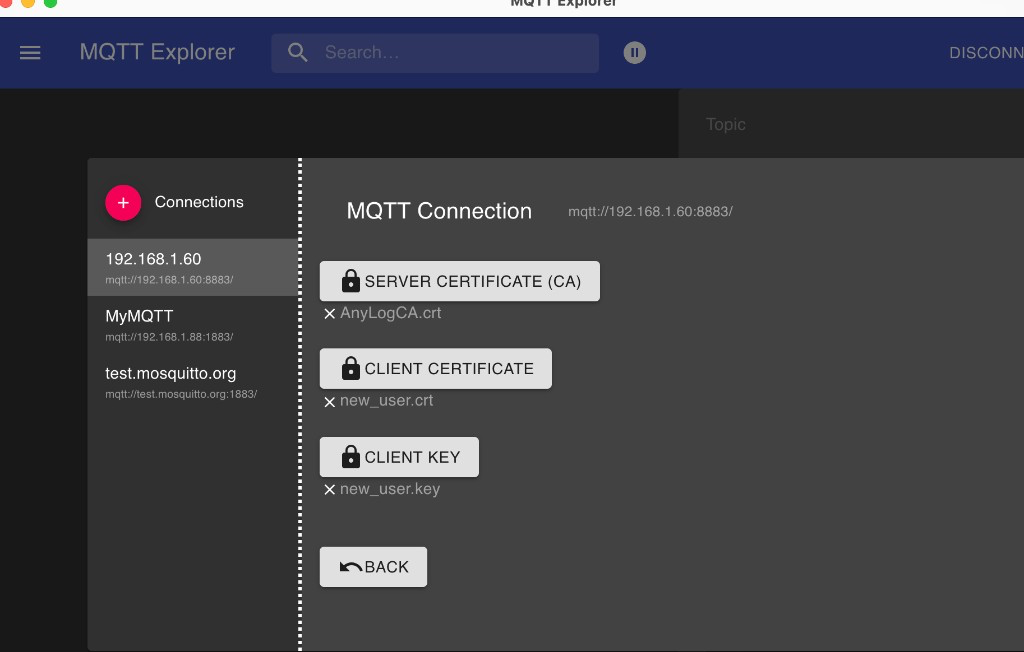
MQTT Explorer client setup
In MQTT Explorer, configure the connection to mqtt://192.168.1.60:8883/ with:
- SERVER CERTIFICATE (CA):
MQTT_CA_TLS.crt(or the broker listener CA) - CLIENT CERTIFICATE: e.g.
user1.crt/AnyLogUser1.crt - CLIENT KEY: e.g.
user1.key/AnyLogUser1.key
Share CA Users in the blockchain
Full example: create a custom client CA (MQTT_CA_users), publish its public certificate as a ca policy, then reuse it on Operators as users_ca (no file copy to every node).
1. Create MQTT_CA_users on the Master
set master_node = 192.168.1.88:32048

<id generate certificate authority where country = US and
  state = CA and locality = "Redwood City" and
  org = MQTT_CA_users and
  output_name = "MQTT_CA_users" and
  hostname = MQTT_CA_users and
  expiration_days = 3650
>
Writes !pem_dir/MQTT_CA_users.crt and !pem_dir/MQTT_CA_users.key. Keep the .key on the Master only.
Optionally issue user certs signed by this CA (same as Create user certificates for an organization):
<id generate certificate request where country = US and state = CA and locality = "Redwood City"
  and org = AnyLog and hostname = user1 and output_name = "user1"
>

<id sign certificate request where ca_org = MQTT_CA_users and ca_output_name = "MQTT_CA_users"
  and server_org = AnyLog and output_name = "user1" and expiration_days = 825
>
2. Add MQTT_CA_users to the blockchain
Publish the public certificate (contents of !pem_dir/MQTT_CA_users.crt) as a ca policy:
# Paste the PEM text from !pem_dir/MQTT_CA_users.crt into the certificate field
<policy = {"ca":{
  "name": "MQTT_CA_users",
  "company": "AnyLog",
  "usage": "CA for mqtt_users",
  "certificate": "-----BEGIN CERTIFICATE-----\n...\n-----END CERTIFICATE-----\n"
}}
>

blockchain prepare policy !policy
blockchain insert where policy = !policy and local = true and master = !master_node
Do not put MQTT_CA_users.key in the policy — only the public certificate.
3. Verify the policy
blockchain get ca where name = MQTT_CA_users
blockchain get ca where name = MQTT_CA_users bring [ca][certificate]
4. On an Operator — load users_ca from the blockchain
users_ca = blockchain get ca where name = MQTT_CA_users bring [ca][certificate]

<run message broker where external_ip = 192.168.1.60 and external_port = 8883 and threads = 6
  and enable_tls = true
  and tls_cert = !pem_dir/server-mqtt-op1.crt
  and tls_key = !pem_dir/server-mqtt-op1.key
  and users_ca = !users_ca
  and allowed_users = (user1, user2)
>
If the listener certificate came from an outside organization instead, use those paths (for example !pem_dir/ext_server_tls.crt / .key) as in Make use of existing certificate files.
Scenario: Master node + Operator with remote signing
Remote signing is optional. Use it when the CA private key must stay on the AnyLog Master node. Background: Optional: remote signing with a master.
Operators do not get CA private keys (MQTT_CA_TLS.key, MQTT_CA_users.key). For users_ca, either copy MQTT_CA_users.crt from the Master or load it from the blockchain (see below). MQTT clients get MQTT_CA_TLS.crt.
| Who | Gets |
|---|---|
| Master | Keeps CA private keys; creates CAs and signs CSRs; can publish MQTT_CA_users to the blockchain |
| Operator | server-mqtt-op1.crt / .key (remote sign) + users_ca via file copy or blockchain |
| MQTT clients | user*.crt / .key and MQTT_CA_TLS.crt |
Topology
| Node | IP:port (example) | Holds | Does |
|---|---|---|---|
| Master | 192.168.1.88:32048 |
MQTT_CA_TLS.key, optionally MQTT_CA_users.key |
Creates CAs; signs CSRs |
Operator op1 |
192.168.1.60 |
server-mqtt-op1.key |
Creates broker CSR; remote-signs; runs MQTT broker |
| MQTT clients | — | user1.key / user2.key |
Publish with mTLS |
On the Master — create broker CA once
<id generate certificate authority where country = US and
  state = CA and locality = "Redwood City" and
  org = MQTT_CA_TLS and
  output_name = "MQTT_CA_TLS" and
  expiration_days = 3650
>
Keep MQTT_CA_TLS.key on the Master only.
Create the client CA and user certificates on the Master (local sign), then give clients only user*.crt / user*.key and MQTT_CA_TLS.crt:
<id generate certificate authority where country = US and
  state = CA and locality = "Redwood City" and
  org = MQTT_CA_users and
  output_name = "MQTT_CA_users" and
  hostname = MQTT_CA_users and
  expiration_days = 3650
>

<id generate certificate request where country = US and state = CA and locality = "Redwood City"
  and org = AnyLog and hostname = user1 and output_name = "user1"
>

<id sign certificate request where ca_org = MQTT_CA_users and ca_output_name = "MQTT_CA_users"
  and server_org = AnyLog and output_name = "user1" and expiration_days = 825
>
Optional — publish MQTT_CA_users.crt to the blockchain for reuse on every Operator (same steps as Share CA Users in the blockchain):
set master_node = 192.168.1.88:32048

# Paste the PEM text from !pem_dir/MQTT_CA_users.crt into [certificate]
<policy = {"ca":{
  "name": "MQTT_CA_users",
  "company": "AnyLog",
  "usage": "CA for mqtt_users",
  "certificate": "-----BEGIN CERTIFICATE-----\n...\n-----END CERTIFICATE-----\n"
}}
>

blockchain prepare policy !policy
blockchain insert where policy = !policy and local = true and master = !master_node
On the Operator — broker CSR + remote sign
set master_node = 192.168.1.88:32048

<id generate certificate request where country = US and state = CA and locality = "Redwood City"
  and org = "Anylog MQTT broker TLS"
  and hostname = op1
  and alt_name = 192.168.1.60
  and ip = 192.168.1.60 and
  output_name = "server-mqtt-op1"
>

<id sign certificate request where ca_org = MQTT_CA_TLS and ca_output_name = "MQTT_CA_TLS"
  and server_org = "Anylog MQTT broker TLS" and output_name = "server-mqtt-op1"
  and expiration_days = 3650
  and certificate_authority = !master_node
>
Result on the Operator: server-mqtt-op1.crt under !pem_dir. The Operator never receives MQTT_CA_TLS.key or MQTT_CA_users.key.
On the Operator — get users_ca (file copy or blockchain)
Option A — copy the file from Master
Copy MQTT_CA_users.crt from the Master’s !pem_dir into the Operator’s !pem_dir. Do not copy CA private keys.
<run message broker where external_ip = 192.168.1.60 and external_port = 8883 and threads = 6
  and enable_tls = true
  and tls_cert = !pem_dir/server-mqtt-op1.crt
  and tls_key = !pem_dir/server-mqtt-op1.key
  and users_ca = !pem_dir/MQTT_CA_users.crt
  and allowed_users = (user1, user2)
>
Option B — load from the blockchain (after the Master published the ca policy above)
users_ca = blockchain get ca where name = MQTT_CA_users bring [ca][certificate]

<run message broker where external_ip = 192.168.1.60 and external_port = 8883 and threads = 6
  and enable_tls = true
  and tls_cert = !pem_dir/server-mqtt-op1.crt
  and tls_key = !pem_dir/server-mqtt-op1.key
  and users_ca = !users_ca
  and allowed_users = (user1, user2)
>
Additional Operators repeat the CSR + remote-sign steps with their own output_name and IP (for example server-mqtt-op2), then use Option A or B for users_ca.
Related
- MQTT Message Broker
- Authentication —
id generate/id sign certificate, including optional remote master signing - DNP3 TLS Setup Example — same Master/Operator remote-sign pattern for DNP3